

KK8 Deposit Guide for Online Top Ups
KK8 provides several deposit channels so account holders can select an available payment method, enter an eligible amount and complete their top up. This guide explains the deposit screen, supported channels, banking options, promotions, important payment precautions and deposit history.
KK8 Deposit Methods
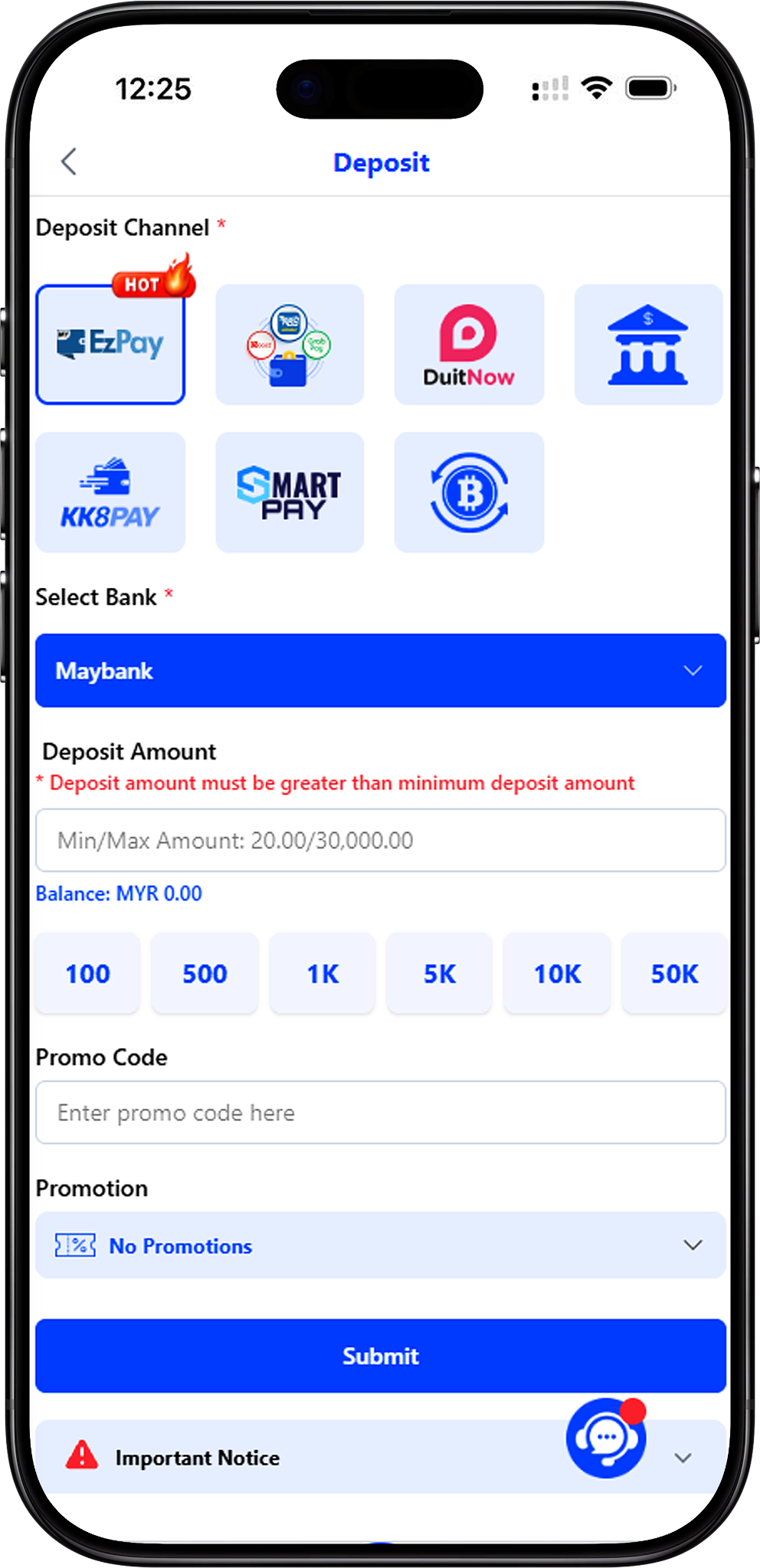
The deposit page displays EzPay, E-Wallet, KK8PAY, Smart Pay and Crypto as deposit channel options. Availability and the required process can differ by channel, so select the method shown in your account and follow its on-screen instructions.
EzPay
EzPay provides an online banking route with a selection of supported Malaysian banks. After choosing EzPay, select the preferred bank and enter an amount within the limits displayed on the deposit screen. For a related walkthrough, see EzPay, FPX and TnGO.
E-Wallet
E-Wallet is available as a separate deposit channel. Players who need instructions for the e-wallet top-up process can follow the E-Wallet Guide.
KK8PAY
KK8PAY is another available payment channel displayed on the deposit page. The process includes selecting the channel, choosing a preferred bank, entering an amount and completing the payment through the relevant banking flow. See the KK8 Pay Guide for detailed instructions.
Smart Pay
Smart Pay is displayed among the available deposit channels. Select it only when it is available for your account and follow the payment information presented on screen before confirming a transaction.
Crypto
Crypto is available as a deposit option. Cryptocurrency transactions require particular care because deposit addresses or QR codes may be generated for one-time use. The USDT Deposit Guide explains the supplied USDT TRC-20 procedure.
How to Make a Deposit
Follow these steps using the information displayed on your account. You can jump directly to Select a Deposit Channel (#select-a-deposit-channel, Anchor Link), Choose Your Payment Details (#choose-your-payment-details, Anchor Link), Enter the Deposit Amount (#enter-the-deposit-amount, Anchor Link), or Review Before Payment (#review-before-payment, Anchor Link).
Step 1: Open the Deposit Page
Sign in to your account and open Deposit. If you need help accessing your account, use KK8 Login before proceeding to the payment page.
Step 2: Select a Deposit Channel
Choose an available channel such as EzPay, E-Wallet, KK8PAY, Smart Pay or Crypto. The fields and payment process shown afterward may depend on the channel selected.
Step 3: Choose Your Payment Details
For a bank-based channel such as the displayed EzPay option, choose your preferred supported bank. For other channels, follow the corresponding payment or wallet information presented by the platform.
Step 4: Enter the Deposit Amount
Enter an amount that meets the minimum requirement shown on screen and remains within the displayed deposit range. The supplied deposit screen shows a Min/Max Amount of MYR 20.00/30,000.00 and also provides preset amount buttons. Check the current values on your own deposit page because available limits may change.
Step 5: Add a Promo Code if Applicable
If you have an eligible promo code, enter it in the Promo Code field. Do not enter an unrelated or expired code. For code-related instructions, see Promo Code Redemption.
Step 6: Select a Promotion if Applicable
Open the Promotion selector to review the options currently presented for the transaction. The supplied screen includes choices such as Top Up RM1000 and get RM4880!, 200% Sportsbook Welcome Bonus, KK8 Day Special 100% Bonus, 50% Daily Slot Reload Bonus, 20% Unlimited Slot Bonus, 10% Daily Live Casino Bonus and 8% Daily Sportsbook Bonus. Review the applicable promotion terms before selecting an offer.
Step 7: Review Before Payment
Confirm the deposit channel, bank or wallet details, amount and any selected promotion before proceeding. Complete any additional authorization requested by your chosen payment provider and check the resulting transaction status rather than submitting the same payment repeatedly.
Supported Banks for EzPay Deposits
The supplied EzPay deposit screen displays multiple banking choices. Bank availability may change, so the options currently shown in your account should be treated as the final reference.
Banks Displayed on the Deposit Page
The supplied screen lists Maybank, CIMB Bank, Public Bank, RHB Bank, AmBank, Affin Bank, Alliance Bank, UOB Bank, OCBC Bank, Bank Islam, Bank Rakyat, Bank Muamalat, Kuwait Finance House, Standard Chartered Bank, Maybank2E, Bank Simpanan Nasional, HSBC Bank and Bank of China.
Check the Bank Details Before Transferring
Account details used to receive deposits may change. Confirm the current account information displayed for your transaction before making a bank transfer instead of relying on previously saved payment details.
Deposit Amount, Promo Code and Promotions
Deposit Limits
The supplied screen displays a minimum of MYR 20.00 and a maximum of MYR 30,000.00 for the selected setup, together with preset buttons for MYR 100, 500, 1,000, 5,000, 10,000 and 50,000. These buttons do not override the applicable minimum, maximum or other transaction requirements shown on screen.
Promo Codes
A dedicated Promo Code field is available on the deposit form. Enter a code only when it applies to your transaction and check the relevant conditions before proceeding.
Deposit Promotions
The Promotion menu lets eligible users choose from offers currently presented for the deposit. Selecting a promotion may introduce specific eligibility, turnover, game, validity or other conditions, so review the offer details rather than assuming every deposit qualifies. Visit KK8 Promotions to review promotional information.
Important Deposit Notices
Confirm Current Account Details
The supplied notice states that receiving account numbers can change from time to time. Always confirm the account number displayed for the current transaction before transferring funds from your bank.
Use the Required Transfer Remark
For applicable bank transfers, the supplied notice instructs users to enter the last four digits of their mobile phone number in the bank transfer remarks. Follow the latest on-screen instructions presented for your transaction.
Use Supported Payment Methods
The notice advises users to use supported payment methods and warns that unsupported third-party transfers may require longer review. Use only the payment channels currently made available through the deposit interface.
Keep Account Names Consistent
For bank-based transactions, the supplied notice states that the depositing bank account name should be consistent with the name submitted for real-name authentication. Users should follow the current account and verification requirements shown by the platform.
Avoid Unnecessary Payment Remarks
The supplied notice warns against including unrelated commercial or transaction descriptions in bank-transfer remarks because certain wording may trigger additional review. Enter only the information requested for the deposit.
Crypto Deposit Safety
Use the Current QR Code or Wallet Address
The supplied crypto instructions state that each generated deposit QR code or wallet address is for one-time use. Obtain the current payment information for each new crypto transaction.
Never Reuse an Old Crypto Address
Do not save or reuse a previously generated crypto deposit address or QR code. Using outdated information may prevent a deposit from being credited correctly. Follow USDT Deposit for the dedicated procedure before transferring USDT.
How to Check Your Deposit History
Review Recent Deposit Records
The Deposit History section can display the Date, Reference No, Transaction, Amount (MYR) and Status for deposit records. This information helps users verify whether a submitted transaction has appeared in their account history.
Search Detailed Deposit History
For a more detailed walkthrough, use Track Your Deposit History to learn how to select Deposit as the transaction type, set the relevant dates and review transaction status.
Find More Deposit Help
Visit the User Guide for additional instructions covering top ups, payment channels, transaction tracking and account functions. You can also start from https://kk8official.my and navigate to the relevant account section.
Make Your Deposit
Choose an available deposit channel, verify the current payment details and amount requirements, and review any selected promotion before completing your transaction.