

KK8 Withdrawal Guide for Bank Transfer, Crypto and Cash Withdrawal
KK8 provides several withdrawal options for eligible account holders, including Bank Transfer, Crypto and Cash Withdrawal. Before submitting a request, review your available amount, turnover requirement, selected payment method and account information to reduce avoidable errors or delays.
Table of Contents
KK8 Withdrawal Options
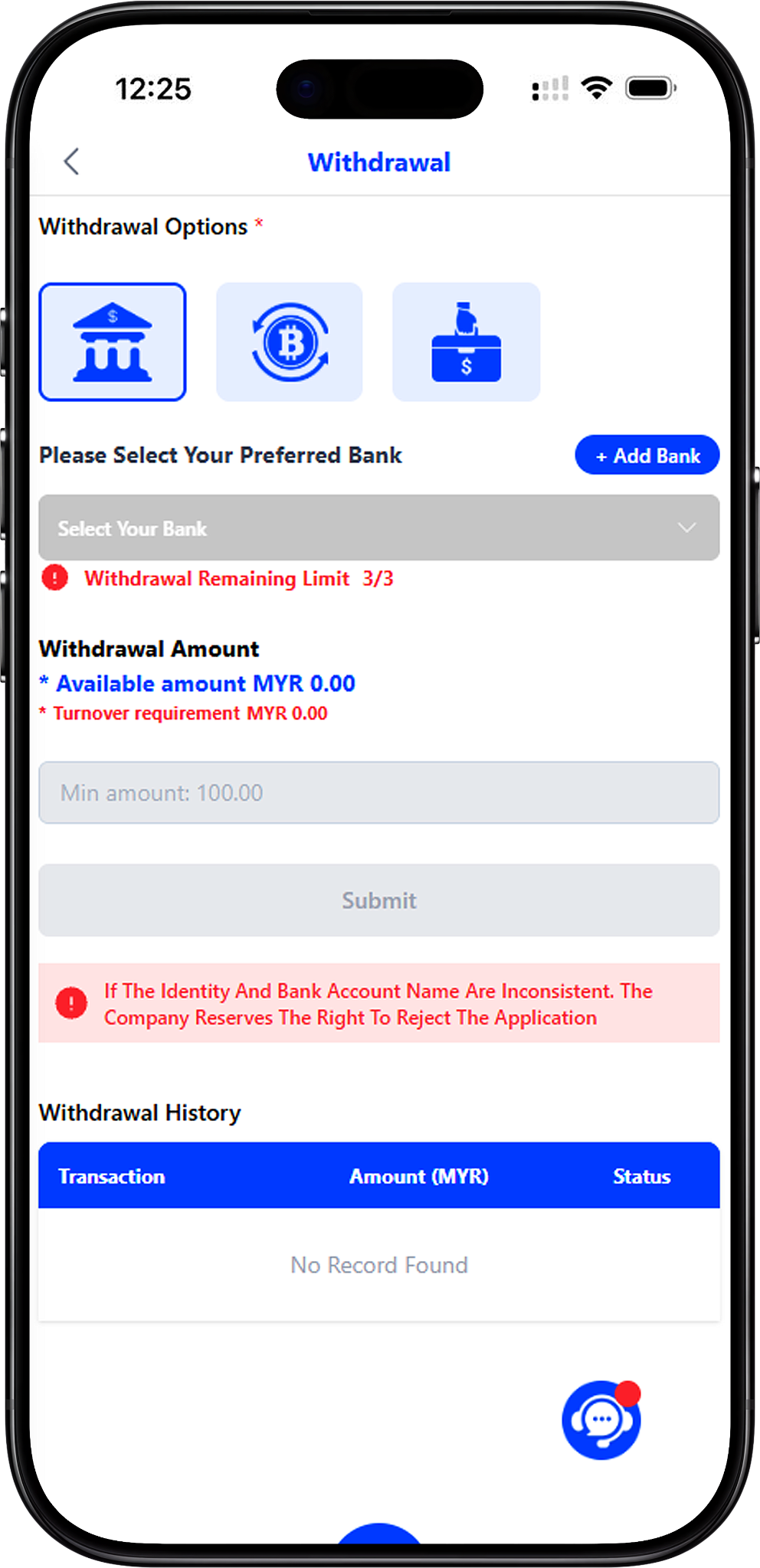
The withdrawal page displays Bank Transfer, Crypto and Cash Withdrawal as available withdrawal options. The fields and requirements may differ depending on the selected method, so follow the current instructions displayed in your account.
Bank Transfer
Bank Transfer allows an eligible withdrawal to be directed to a preferred bank account associated with your account. Before submitting the request, confirm that the selected bank and account-holder information are correct.
Crypto
Crypto is displayed as another withdrawal option. When using a cryptocurrency method, carefully review the wallet, network and transaction information presented during the withdrawal process before confirming the request.
Cash Withdrawal
Cash Withdrawal is also displayed as an available option on the withdrawal page. Select this method only when it is available to your account and follow the specific instructions shown for the transaction.
Identity Verification Before Withdrawal
Identity verification helps connect the withdrawal account with the account holder’s submitted information. The supplied verification screen requests a full name, bank, bank account number, phone number and OTP code before verification can be completed.
Full Name as per Bank Account
Enter your full name as it appears on the relevant bank account. Accurate information is important because the withdrawal page warns that an application may be rejected when identity and bank account names are inconsistent.
Select Your Bank
Choose the bank associated with the account you intend to use for withdrawals. Review your selection before continuing so the banking information corresponds with the intended account.
Enter Your Bank Account Number
Provide the applicable bank account number carefully. Check the digits before verification to avoid associating an incorrect account with your withdrawal details.
Verify Your Phone Number With OTP
Enter your phone number and select Send OTP. Once the verification code is received, enter the OTP in the designated field and complete the verification. If the OTP does not arrive, use the Contact Us option displayed on the verification screen for assistance.
How to Make a Withdrawal
Follow the withdrawal process in order and check each detail before submitting your request. Use these anchor links to jump to Select a Withdrawal Option (#select-a-withdrawal-option, Anchor Link), Choose Your Preferred Bank (#choose-your-preferred-bank, Anchor Link), Enter the Withdrawal Amount (#enter-the-withdrawal-amount, Anchor Link), or Submit the Withdrawal Request (#submit-the-withdrawal-request, Anchor Link).
Step 1: Open the Withdrawal Page
Sign in to your account and navigate to Withdrawal. If you need help accessing your account, visit KK8 Login before starting the withdrawal process.
Step 2: Select a Withdrawal Option
Choose Bank Transfer, Crypto or Cash Withdrawal according to the methods currently available to your account. Bank Transfer requires you to select an appropriate withdrawal bank account.
Step 3: Complete Identity Verification if Required
If verification is requested, provide your full name as shown on the bank account, select the bank, enter the account number and phone number, request the OTP, and enter the received code to verify your information.
Step 4: Choose Your Preferred Bank
For Bank Transfer, select a previously added bank account from the preferred bank field. If the required account is not available, use the Add Bank function and complete the necessary account details first.
Step 5: Check Your Available Amount
Review the available withdrawal amount displayed on the page. The amount you request should not exceed the eligible amount currently available for withdrawal.
Step 6: Review the Turnover Requirement
Check the turnover requirement shown beneath the available amount. Any applicable requirement should be satisfied according to the conditions displayed in your account before a withdrawal can proceed successfully.
Step 7: Enter the Withdrawal Amount
Enter an amount that meets the current minimum and other applicable withdrawal requirements. The supplied screen displays a minimum amount of MYR 100 and quick-select options of MYR 100, 200, 500, 1,000 and 2,000. Treat the current values displayed in your account as the final reference because limits may change.
Step 8: Review Your Information
Confirm your withdrawal method, bank account, account-holder information, available amount and requested amount before proceeding. For bank withdrawals, make sure the identity and bank account names are consistent.
Step 9: Submit the Withdrawal Request
Select Submit after confirming that all required information is correct. Avoid repeatedly submitting the same request while an existing withdrawal is being processed; instead, review its status in your withdrawal records.
For a dedicated walkthrough of this process, visit How To Withdraw.
Bank Account and Withdrawal Requirements
Identity and Bank Account Names Should Match
The withdrawal screen specifically warns that if the identity and bank account names are inconsistent, the application may be rejected. Use banking information belonging to the correctly verified account holder and check the details before submitting a request.
Use a Verified Withdrawal Account
Select the appropriate saved bank account when making a Bank Transfer withdrawal. If you need another account, add and verify the required payment method rather than entering unrelated banking information.
Check the Remaining Withdrawal Limit
The supplied interface displays a Withdrawal Remaining Limit indicator. Check the current value on your account before making additional withdrawal requests because applicable limits can depend on current platform conditions.
Withdrawal Amount and Turnover Requirements
Available Amount
The Available Amount represents the amount currently shown as available for withdrawal. Check this figure immediately before entering your requested amount rather than relying on a previous balance.
Minimum Withdrawal Amount
The supplied interface shows a minimum withdrawal amount of MYR 100 for the displayed setup. Current account conditions take precedence, so verify the minimum shown on your own withdrawal page before submitting a request.
Turnover Requirement
The withdrawal interface separately displays the turnover requirement. If a requirement remains outstanding, review the applicable account, bonus or promotion conditions before attempting to withdraw the related funds.
Bonus Wallet Funds
Some bonus funds may be subject to turnover requirements before they can be moved to the main wallet. The How To Use Restore Button Correctly guide explains the supplied process for transferring eligible leftover bonus or free-credit balances after the required turnover has been met.
How to Add a New Withdrawal Bank Account
Select Add Bank
If your preferred account is not already available, select + Add Bank from the withdrawal page. Complete any identity verification requested by the platform before continuing.
Provide Accurate Banking Information
Choose your preferred bank and enter the corresponding account information carefully. Your identity information and bank account holder name should be consistent with the platform’s verification requirements.
Follow the Dedicated Bank Account Guide
For the complete process, see How To Add New Withdrawal Account, which explains how to select a payment method, choose a bank and submit the account information.
How to Check Withdrawal History
Review Withdrawal Records
The Withdrawal History section is designed to display transaction details including Date, Reference No, Transaction, Amount (MYR) and Status. Use these records to check the progress and result of submitted withdrawal requests.
Search Withdrawal History by Date and Status
For more detailed tracking, follow Track Your Withdrawal History. The guide explains how to select Withdrawal as the transaction type, specify start and end dates, choose a status such as pending, approved or rejected, and review the matching records.
Important Withdrawal Tips
Check Every Detail Before Submitting
Review the selected withdrawal option, bank information, account-holder name, requested amount and current turnover requirement. Correct information helps reduce problems caused by mismatched or incomplete withdrawal details.
Do Not Assume Limits Are Permanent
Minimum amounts, remaining withdrawal limits, available balances and other conditions displayed on the platform can change. Use the current information presented during your transaction as the applicable reference.
Review Your Transaction Status
After submitting a request, check Withdrawal History for its current status. A pending transaction should not automatically be treated as completed or rejected until the status is updated.
Use the Relevant Account Guides When Needed
The User Guide provides instructions covering account management, deposits, withdrawals and transaction histories. Users who need to fund their main wallet before using other platform functions can also review Deposit.
Access the Platform
You can start from https://kk8official.my and navigate to your account’s Withdrawal section to check the withdrawal methods and requirements currently available to you.
Submit Your Withdrawal Request
Verify your identity and payment details, check your available amount and turnover requirement, then select an available withdrawal method and review everything before submitting.