

Create Your KK8 Account
KK8 provides several registration methods so eligible users can choose an account setup that suits them. The registration page supports One-click, Phone and Email options, while some methods may require additional account details or OTP verification. Read the applicable terms before creating an account and use accurate information where requested.
New users can also read the How to Register guide (/en/user-guide/how-to-register) (Internal Link) for additional account setup guidance, or visit https://kk8official.my (Naked URL) to access the main website.
How to Register a KK8 Account
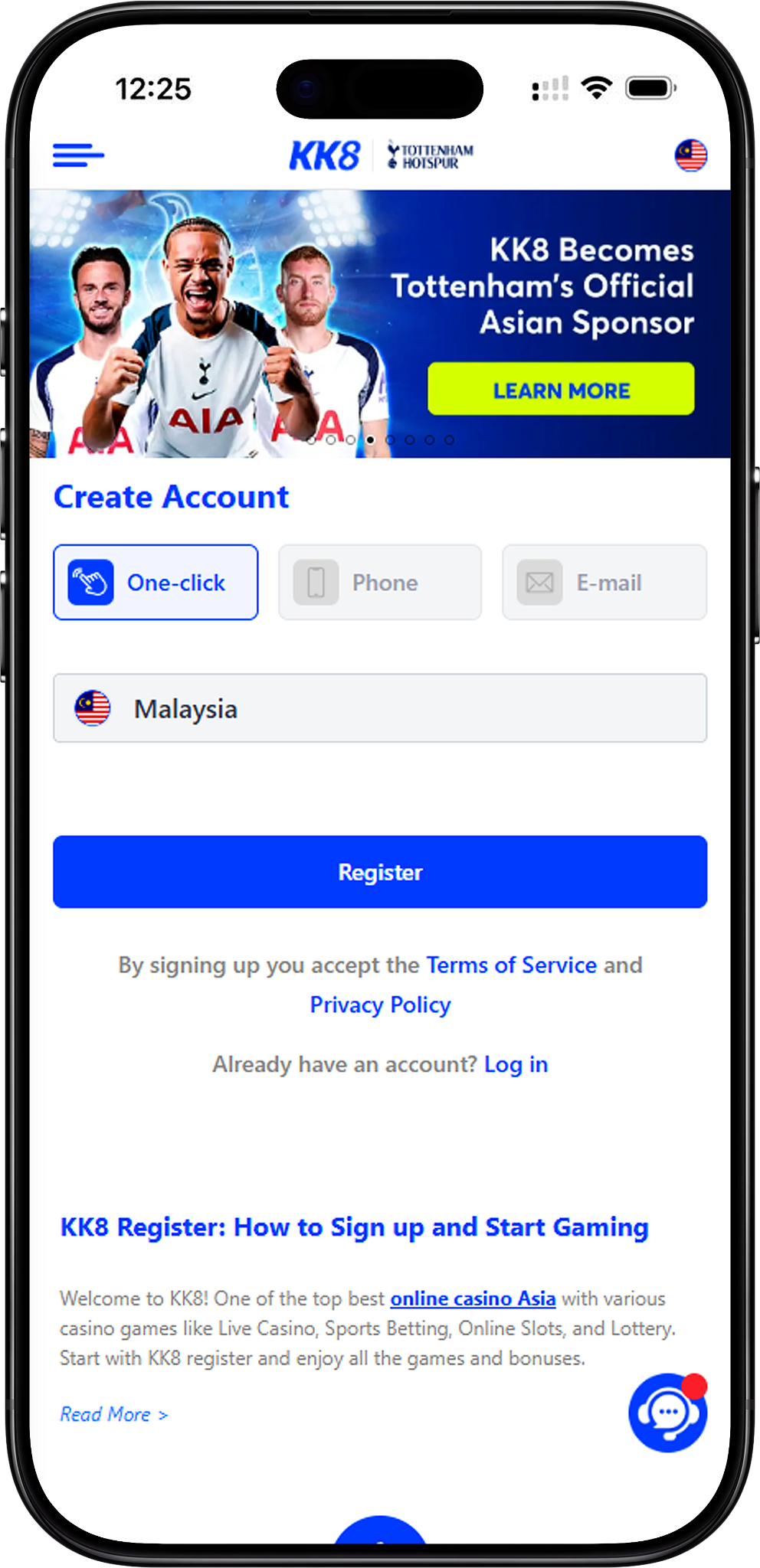
Creating an account is designed to be straightforward. Follow the steps below and select the registration option available to you. You can jump directly to Step 1 Choose Your Registration Method (#step-1-choose-your-registration-method) (Anchor Link), Step 2 Enter the Required Details (#step-2-enter-the-required-details) (Anchor Link), Step 3 Complete OTP Verification When Required (#step-3-complete-otp-verification-when-required) (Anchor Link), Step 4 Review the Terms and Privacy Information (#step-4-review-the-terms-and-privacy-information) (Anchor Link), or Step 5 Create Your Account (#step-5-create-your-account) (Anchor Link).
Step 1 Choose Your Registration Method
Start by selecting One-click, Phone or Email on the Create Account screen. The options displayed can depend on the registration flow available at the time. Choose the method you can access and verify reliably.
Step 2 Enter the Required Details
Complete the fields shown for your selected method. Email registration, for example, may request a UID, password and email address. Use a memorable UID where permitted, provide an email address you control, and create a strong password that is not reused on other services.
Step 3 Complete OTP Verification When Required
If your selected method requires verification, request the OTP and enter the code received through the applicable contact channel. Never disclose an OTP or account password to another person. If a verification code does not arrive, confirm that your contact details are correct before requesting another code.
Step 4 Review the Terms and Privacy Information
Before submitting the registration form, review the Terms and Conditions (/en/terms-and-conditions) (Internal Link) and Privacy Policy (/en/privacy-policy) (Internal Link). These pages provide important information about account rules, eligibility, privacy and the handling of user information.
Step 5 Create Your Account
Check the information you entered and select Register to submit the form. After the account is created successfully, keep your UID and password secure. Existing users should use the Login page (/en/login) (Internal Link) rather than creating unnecessary duplicate accounts.
Choose a Registration Method
KK8 account creation offers different sign-up routes for convenience. The best option depends on the contact information available to you and whether verification is required for that registration method.
One-click Registration
One-click registration provides a streamlined route for users who want to begin account creation with fewer initial fields. After selecting One-click, check the information presented on screen and complete any subsequent account or verification requirements before using the account.
Phone Registration
Phone sign up uses a mobile number as part of the registration process and may require an OTP to confirm access to that number. Enter a phone number you control and check the country selection before requesting a verification code.
Email Registration
Email sign up may ask you to create a UID and password, provide an email address, and enter an OTP code. Select Send OTP only after checking that the email address is correct, then enter the verification code in the registration form when it arrives.
Information You May Need to Register
The information requested varies by registration method. Only provide details requested by the official registration form, and make sure important contact information is accurate so that account verification and recovery functions can work correctly.
UID and Password
Your UID identifies your account for supported login and account functions. Choose an available UID according to the on-screen requirements and pair it with a strong, unique password. Do not share login credentials with other people.
Phone Number or Email Address
A valid phone number or email address may be used for verification and account-related communications. Use contact details you can access directly, especially when an OTP is required to finish registration.
Personal Information
If additional personal details are requested during account setup or subsequent verification, enter accurate information that matches any supporting information you may later be required to provide. Review the privacy information to understand how submitted data is handled.
Complete Account Verification
Account verification helps confirm that the contact details associated with a registration are accessible to the user. The exact verification process can vary according to the sign-up method and account requirements.
How OTP Verification Works
When an OTP field is displayed, enter your phone number or email address as required and select Send OTP. Retrieve the code from the corresponding channel and enter it in the OTP field before it expires. Request a new code if the previous one is no longer valid.
If You Cannot Receive an OTP
First confirm that the phone number or email address was entered correctly and check whether the message was filtered or delayed. Avoid repeatedly requesting codes in a short period. If the problem continues, use the official support channel shown on the website for assistance.
What to Do After Registration
Once registration is successful, users can sign in and review the account interface before using other platform functions. Account access, payment options, promotions and individual services may be subject to separate requirements and terms.
Sign In to Your Account
Visit KK8 Login (/en/login) (Internal Link) and enter the credentials associated with your account. If you cannot remember your UID or password, use the relevant account recovery instructions instead of repeatedly entering incorrect credentials.
Learn How the Platform Works
New users can visit the User Guide (/en/user-guide) (Internal Link) for instructions covering account and platform functions. Users who have forgotten their credentials can also read Forget UID (/en/user-guide/forget-uid) (Internal Link) or Forget Password (/en/user-guide/forget-password) (Internal Link).
Review Available Promotions Before Claiming an Offer
Welcome offers and other bonuses may have eligibility rules, wagering requirements, validity periods and additional conditions. Visit Promotions (/en/promotions) (Internal Link) to review currently displayed offers and their applicable terms rather than assuming every new account qualifies for the same bonus.
Register Safely and Responsibly
Account security should begin during sign up. Access the service through its official pages, protect your credentials and understand the rules that apply before depositing money or participating in gambling activities.
Protect Your Account Details
Use a unique password, keep OTP codes private and avoid saving credentials on shared or public devices. Be cautious of unsolicited messages requesting passwords, verification codes or payments. Official support should not require you to disclose your password.
Check Eligibility Before Creating an Account
Online gambling laws and age requirements vary by location. Register and use gambling services only when you meet the applicable legal-age and jurisdiction requirements. Gambling involves financial risk, and bonuses should not be treated as guaranteed profit or winnings.
Read the Rules Before Depositing
Before funding an account, review applicable transaction requirements and platform terms. The Deposit guide (/en/deposit) (Internal Link) explains available deposit information, while the Withdrawal guide (/en/withdrawal) (Internal Link) can help users understand the withdrawal process and relevant requirements.
Frequently Asked Questions About Registration
What registration methods are available?
The Create Account page shows One-click, Phone and Email registration options. Availability and required fields may vary, so follow the instructions displayed for the method you select.
Do I need an OTP to create an account?
An OTP may be required for registration methods that verify a phone number or email address. When verification is requested, use a contact method you control and enter the received code only on the official registration form.
What should I do if registration fails?
Check that all required fields are complete, confirm that your contact information and OTP are valid, and review any error message shown on screen. If the issue remains unresolved, contact the official live chat or support channel available on the website.
Can I register again if I already have an account?
Existing users should normally access their account through the login page. Before creating another account, review the applicable account rules or contact support, because duplicate-account restrictions may apply.
Where can I find more account help?
Visit the FAQs (/en/faqs) (Internal Link) for common questions or the User Guide (/en/user-guide) (Internal Link) for instructions covering registration, account recovery, deposits, withdrawals and other platform functions.
Ready to Create Your Account?
Choose an available registration method, provide the required information, complete verification when requested, and review the applicable terms before submitting your account registration.